
Daphne v2.04
Windows task manager replacement
Description
Daphne is the first open source Windows task manager replacement. Was created back in 2005 during development of an electrical network management software. Debugging this application required to constantly kill a set of running processes. That was the first Daphne function: allow for configuring menu items with an associated process list, and terminating those process with a single click. With the time Daphne became more popular and users kept asking for new functionality. Its full feature list is now quite large.
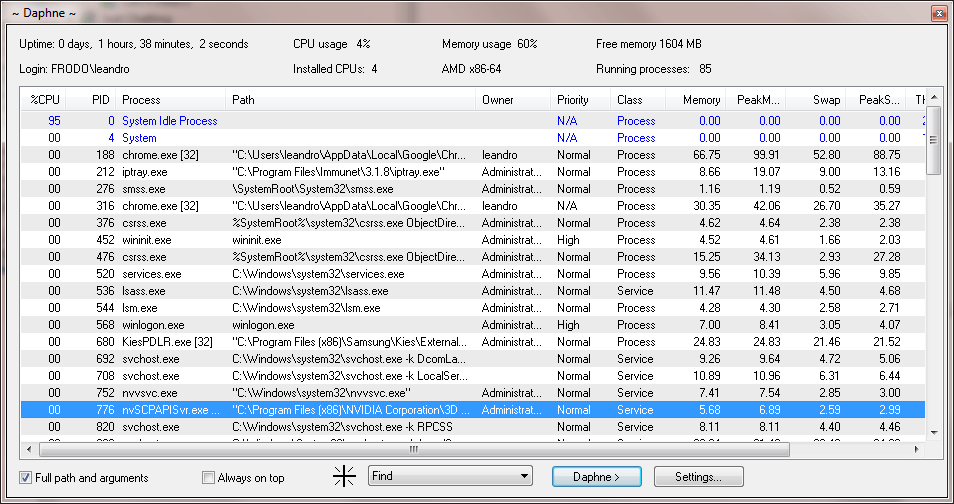
Today you can kill a process by dragging the mouse over the windows, by right-clicking the in the main process list, or by typing its name with the Kill all by name command. You can set a any window to be always on top, to an arbitrary size, to be transparent, enable/disable, and more.
You can trust Daphne because it’s open source and full source code is published for download in this page along with the binary installers. MD5 and SHA1 hashes are provided for file integrity validation after download. Daphne installers don’t offer third party software installation and this application is provided free of charge. If you find this not being respected by a third party download site, please let me know.
New in Daphne v2.04
- Windows Explorer integration bug fixed
- Updated French translation
- Updated Chinese translation
Thanks
To Magnus Hansson and Vitaliy Dovgan for helping with the testing under 32 bits and Windows XP operating systems. To the “Translation team” - Åke Engelbrektson, Giacomo Margarito, Arno Krumpholz, Gin, Marc Cueni, 風逸蘭, He Zhenwei, Forth Bunny, Vicent Adam, Michał Trzebiatowski, Jangir Ganeev, Alisa Bagrii, Paulo Guzmán, Renato Euclides da Silva, Asabukuro Dongorosu, Abdurrahman Aborazmeh and Jim Lineos. To Zach Hudock for making Daphne portable at PortableApps project To Barry Cleave for writing a review of Daphne named “Daphne - Modify, Control & Kill windows process with Your Mouse” To Jake Carter and George Norman from findmysoft.com for this review and video about Daphne
Runs on:
- Windows 2003
- Windows Vista
- Windows 7
- Windows 8
- Available for 64 bits platforms (x64)
Downloads
Original binary installers provided by this web site won’t offer you to install third party software. Please use MD5 or SHA1 hashes for validatin downloaded files.
Daphne-setup 32 bits - MD5 - SHA1 - 6.4MB - September 26, 2014
Daphne-portable 32 bits - MD5 - SHA1 - 6.0MB - September 26, 2014
Daphne_setup 64 bits - MD5 - SHA1 - [MD5] - [SHA1] - 6.6MB - September 26, 2014
Daphne-portable 64 bits - MD5 - SHA1 - 6.1MB - September 26, 2014
Daphne is licensed under the GNU General Public License
Source code distribution: Daphne-src.7z) - 309KB - Daphne v2.04 - September 26, 2014
Features
- Main window
- CPU and memory information
- Comprehensive process list
- Access to drag-and-drop tool
- Drag-and-drop tool (Drop tool over any window)
- Find the process which owns a given window
- Find the window in the process windows tree
- Kill the process which owns a given window
- Hide window and remove application from task bar (application keeps running completely hidden, and can be restored later)
- Set or remove always on top property
- Set or remove transparency (alpha)
- Enable or disable window or control
- Change window size using numbers (i.e. 640x480)
- Save window position and size and restore when the process is started
- Process list
- Including CPU usage, PID, full path and arguments, owner, class (process or service), memory and swap usage, I/O count.
- Item highlighting with colors for custom, system and high CPU-consumption processes.
- Sortable by any column
- Quick search-as-you-type find by process name when sorted by Process column
- Customizable column position and width
- Contextual menu allows for:
- Kill the process or ask it to finish execution
- Schedule process kill for later
- Set focus
- Set or remove always on top
- Create a trap
- Change processor affinity mask and optionally trap this configuration
- Change process priority
- Handle service (start, stop, pause and continue)
- Copy process name, PID, path, MD5 or SHA1 to clipboard
- Open containing folder
- Look for or submit to DRK process database.
- Access to process properties window
- Process properties window
- Full command line
- Parent process and user
- Startup timestamp
- Kernel and user time
- Show and handle minimum and maximum working set size
- Windows tree allows for:
- Set focus
- Show or hide window or application
- Handle always on top
- Make window resizable
- Turn caption on and off
- Send a window message (i.e. WM_ACTIVATE) with lParam and wParam values
- Thread list with priority and CPU time
- Loaded modules
- Environment variables
- I/O information
- Daphne main menu (accessible from tray icon too)
- Kill all process by matching name
- Run process as other user
- Close windows by matching title
- Schedule popup message
- Schedule system shutdown
- Access CPU usage graph
- Open process hierarchy tree
- Installed software list for inspecting installed software available in tray icon menu. Installed software
- Control inspector window for revealing hidden passwords and other control information
- Hidden applications and scheduled tasks list
- Copy process list to clipboard
- Windows 7 God Mode and Problem steps recorder
- Traps
- Apply to any process, when its startup is detected.
- Notify process has been created
- Kill it
- Hide the application
- Set always on top on/off
- Set transparency (alpha)
- Set desired priority
- Notify process destroyed/exited
- Set process affinity mask
- Keep window position and size
- Kill menu: User-defined menu items. Every item has a process list and kill them when activated.
- Four user-defined command lines to be executed if Ctrl-Shift-F1 to F4 combination is pressed. Works globally.
- Windows explorer contextual menu integration for files and folders
- Copy name of full path to clipboard
- Copy folder file listing to clipboard
- Open command line (CMD) in folder
- Check which process has a file opened
- Google folder or file name
- Compute MD5 or SHA1 hash, validate and create hash file
- Optional global and customizable activation shortcut for showing Daphne main window.
- Tool for creating log file of every started and stopped process and applied traps.
- You can make configuration portable using INI file instead of registry base configuration.
- Take care: process names may be eclipsed by malicious software.
- Command line tool for accessing process list and killing processes by name, a kill menu item, or computing MD5 and SHA1 hashes.
- Internationalization: Spanish, Italian, German, French, Chinese, Swedish, Valencian, Polish, Russian, Portuguese, Japanese, Arabic and Greek support.
- Enhanced (experimental) multidesktop feature: use up to four windows desktops using WindowsKey + F5 to F8.